
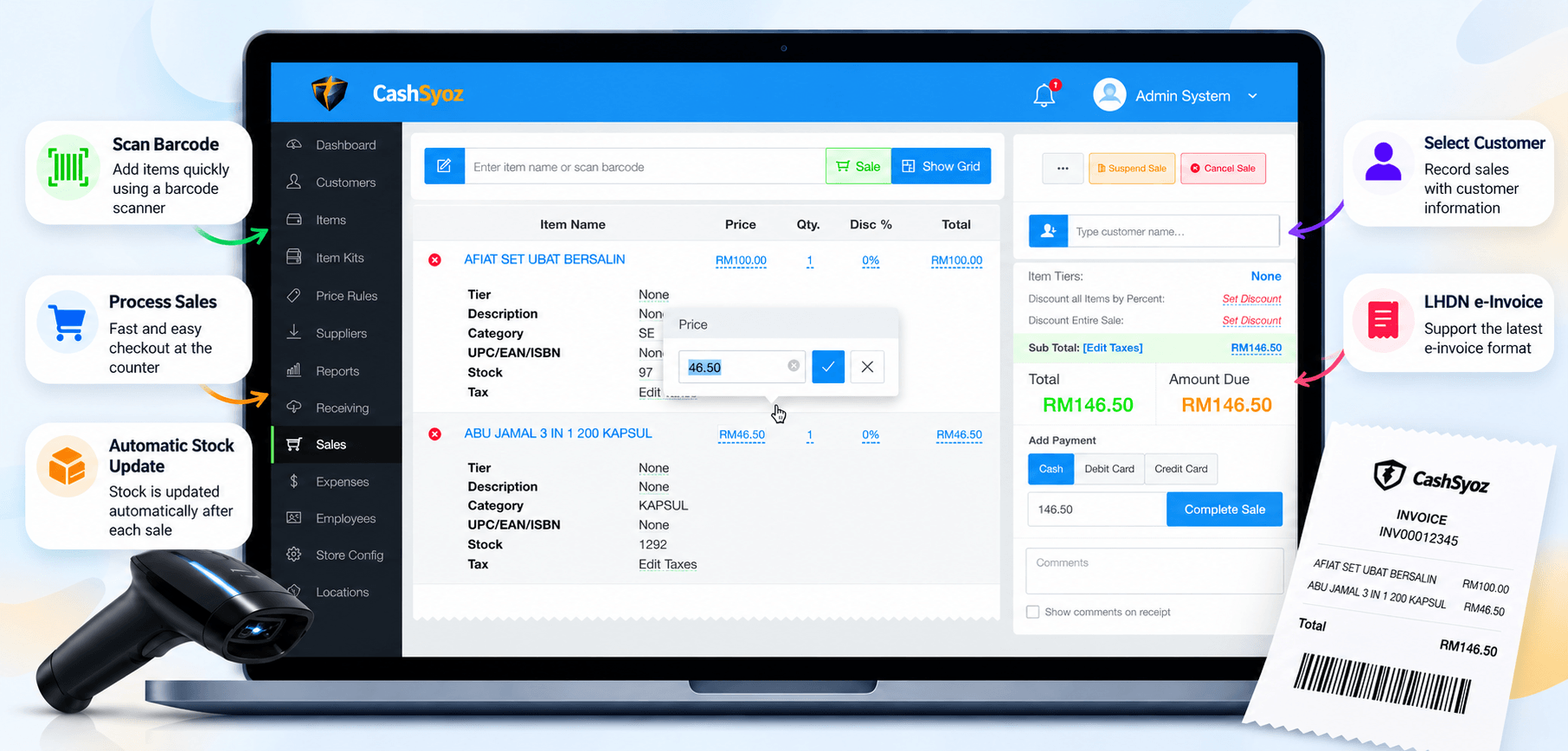
The essentials
Running a small business in Malaysia means balancing customers, stock, suppliers, payments and daily records. Whether you manage a minimart, boutique, pharmacy, café or neighbourhood shop, manual processes can become harder to manage as transactions increase.
A POS system for small business in Malaysia brings checkout and sales records into a more organised workflow. Depending on the system, it may also connect product information, inventory and reporting—helping you spend less time reconciling records and more time serving customers.
What Is a POS System?
A point-of-sale (POS) system is the software and equipment used to record a purchase and complete a sale. Depending on your setup, it may include a computer or tablet, barcode scanner, receipt printer, cash drawer and payment terminal.
A modern POS system can do more than calculate a bill. It may store product details, record transaction history, apply discounts, support selected payment methods and generate sales reports. When POS and inventory functions are connected, stock quantities can also update as sales are recorded.
Imagine your shop sells several units of the same product during a busy afternoon. With a POS system connected to inventory, completed sales can be recorded and stock quantities adjusted in the system. You can then review the remaining stock instead of relying only on memory or handwritten notes.
Why Do Small Businesses Use POS Systems?
The main benefit is not simply replacing a cash register with newer technology. A suitable system can help make routine tasks more consistent and business information easier to review.
More organised checkout
Search or scan products, confirm quantities and calculate totals from one screen, reducing repeated manual calculations.
Better stock visibility
Review product quantities and identify items that may need replenishment when inventory features are available.
Clearer sales records
Use transaction histories and sales summaries to understand what sold and review daily performance.
More consistent workflows
Keep product details and checkout processes organised for staff, subject to the functions supported by the system.
Features to Look for in a POS System for Small Business Malaysia
Not every shop needs a complicated platform. Start with the tasks that take the most time today, then compare systems against those needs.
Small business POS checklist
- Easy checkout: staff can learn the sales screen and process common transactions without unnecessary steps.
- Product and barcode management: add, search and update products efficiently.
- Inventory tracking: review stock quantities and stock movement where supported.
- Sales reports: view transaction history and useful daily or periodic summaries.
- Payment compatibility: confirm support for the payment methods your customers use and check any provider or transaction fees.
- Hardware compatibility: check whether your existing computer, tablet, scanner, printer and cash drawer can be used.
- Data backup and access control: understand how business records are protected and who can access them.
- Local support: ask how to get help, what support hours apply and whether training is included.
- Invoicing requirements: confirm any e-Invoice or other compliance-related functions directly with the provider and relevant official guidance.
- Transparent pricing: compare setup, subscription, hardware, maintenance and optional feature costs.

Which POS System Suits Your Type of Business?
The right POS system depends on how your business operates. Compare options based on your real workflow rather than choosing a system simply because it has the longest feature list.
For minimarts and grocery shops
Prioritise quick barcode scanning, product lookup, stock tracking, clear sales records and a checkout flow that works during busy periods. If you sell products with different units or variants, check how the system handles them.
For boutiques and specialty retailers
Look for easy product and variant management, such as sizes or colours, together with stock visibility and sales reports. If you operate more than one outlet, ask whether inventory and reporting can be viewed across branches.
For cafés and restaurants
Check whether you need table management, order modifiers, kitchen order handling, menu management or split bills. Restaurant workflows can differ considerably from a standard retail checkout, so request a demonstration using a typical order.
For growing businesses with multiple outlets
Consider staff permissions, consolidated reporting, branch-level stock visibility and how data is synchronised. Confirm which features are included in the package and which require an additional subscription or module.
How to Choose the Right POS System
- List your current problems. Identify whether checkout speed, stock accuracy, reporting or payment handling needs the most attention.
- Match features to your business type. Separate must-have functions from features that would simply be nice to have.
- Request a realistic demonstration. Ask the provider to show a normal sale, a product return if relevant, a stock update and the report you expect to use.
- Check hardware and internet requirements. If offline selling is important, ask exactly which functions remain available when the internet connection is lost and how transactions synchronise later.
- Compare total cost. Include hardware, setup, training, subscription, support, payment fees and any optional modules.
- Think about future growth. Consider whether the system can support more products, staff, branches or integrations if your business expands.
How Much Does a Small Business POS System Cost?
The total cost varies by provider, package, hardware and the features you need. Some setups may involve a recurring software subscription, while others may charge separately for installation, devices, training, support or add-on modules. Payment providers may also charge transaction fees.
Rather than comparing only the advertised monthly price, request a written breakdown of the costs over the period you expect to use the system. Confirm what happens if you stop using the service and how you can export or retrieve your business records.
Ask the provider to explain data backups, user permissions, customer support, software updates, hardware compatibility and any compliance-related capabilities that matter to your business. Get the answers in writing where possible.
Frequently Asked Questions
What is the best POS system for a small business in Malaysia?
The best option depends on your business type, budget, hardware, payment methods and inventory needs. Compare a few providers and test a realistic workflow before deciding.
Does a small business need a POS system?
Not every business needs a full-featured POS. It may be worth considering when manual sales records, stock checks or reporting take too much time or become difficult to maintain accurately.
Can a POS system track stock automatically?
Many systems can update stock when sales are recorded, provided inventory functionality is included and products are configured correctly. Confirm how returns, adjustments and stock counts are handled.
Can I keep using my existing devices?
Possibly. Compatibility depends on the POS software and your devices. Check operating system requirements and supported scanners, printers, cash drawers and payment terminals before purchasing.
What should I check about e-Invoice support?
Ask the provider what invoicing features are available, what setup is required and whether additional fees apply. Verify your business obligations and timelines using current guidance from the relevant Malaysian authorities.
Final Thoughts
Choosing a POS system for small business Malaysia starts with understanding how your shop works and where manual tasks are slowing you down. Prioritise a solution that staff can use comfortably, keeps sales records organised, supports the devices and payment methods you need, and fits your budget.
CashSyoz is one option you can review as part of your research. Compare its available features and workflow with your requirements, and request a demonstration so you can make an informed decision for your business.
Ready to make your shop operations more organised?
Explore CashSyoz and compare its POS workflow with the everyday needs of your business.
Explore CashSyoz ↗